About 90% of 3D artists will read the first sentence about this tool and go: “Okay… but why would I need that?”
The other 10% will stare at the screen like they have just discovered a unicorn that was specifically bred to fix their Monday morning problems.
You know the problem. A perfectly reasonable request arrives from a designer who has apparently had a difficult weekend: move the sponsor logo, add another decal, squeeze this asset into the existing atlas, preserve the texture density, and please do it for the other eighty variations too. The model already has UVs. The textures are already painted. Nothing is technically broken. Which is exactly what makes the job so annoyingly expensive.
You move one UV island in your DCC. The wire moves. Great. Except the paint does not. So now you are moving pixels, rebuilding maps, checking alignment, fixing normals, and quietly wondering whether “asset preparation” was always supposed to be this much of a punishment.
That is the job UV Surgeon is trying to kill.
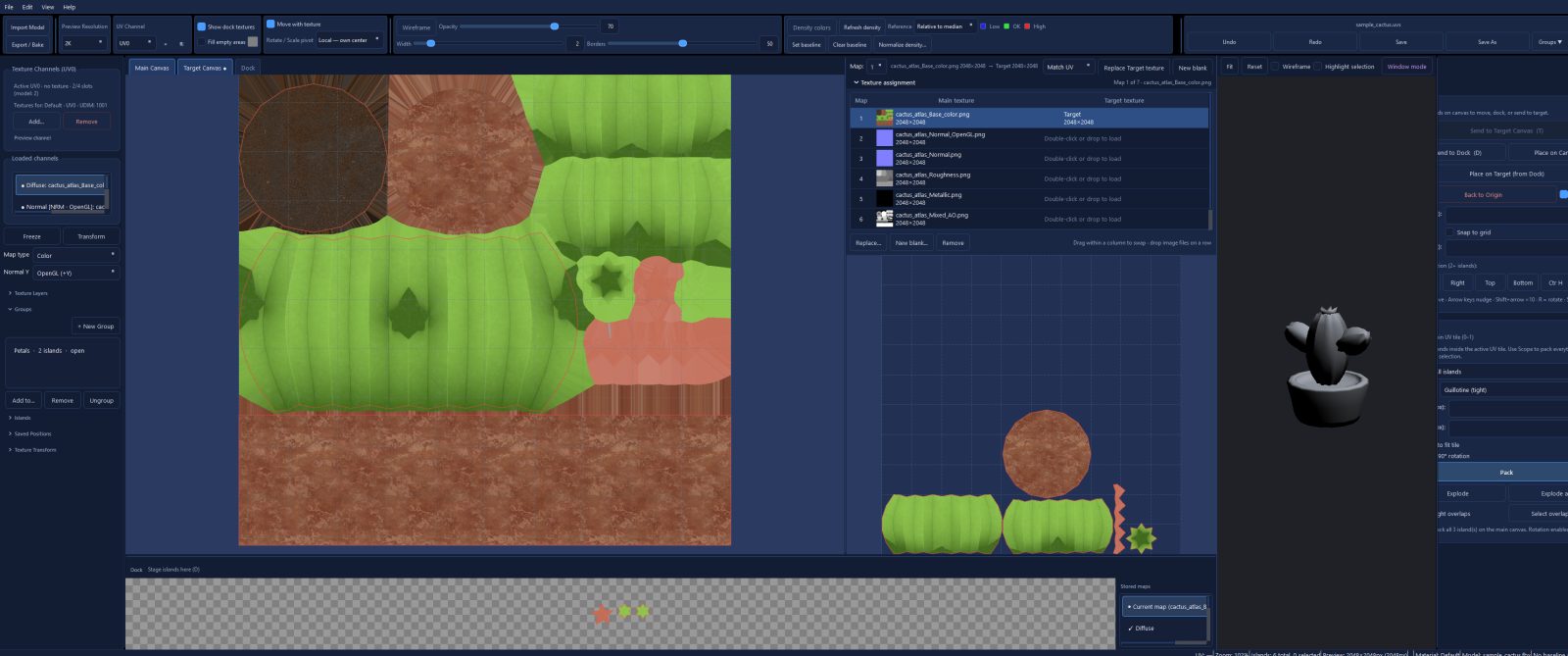
Load an already-UV'd mesh. Move, rotate and scale the islands. With Move with Texture enabled, the paint comes with them — diffuse, normal, roughness and the rest of the texture stack, not just the wireframe. Park islands in the Dock while you clear the main texture, or send them to Target textures when you are building a new layout.
The useful part is that the tool treats the texture maps as part of the operation instead of pretending they are someone else's problem. Each map can have its own Target texture, and when source and destination resolutions differ you can either match UV size or preserve the original texel density when baking.
Need another UV set for decals or a lightmap? That is where the extra UV sets become useful. And if your pipeline has gone full UDIM goblin, I am not judging you. Well, maybe a little. But the workflow is still built around moving islands and their paint rather than making you rebuild the whole thing from scratch.
Then bake the maps and write the result back out. PNG, TGA or JPEG for textures; OBJ, GLB (up to four UV sets), or an FBX UV patch for the mesh. There is also a 3D preview when the GPU cooperates. If OpenGL decides today is the day it wants to become a problem, the 2D editor still works.
And no, this is not an unwrapper. The mesh already needs UV islands. That limitation is intentional. UV Surgeon is for the moment after the unwrap — when the UVs are technically done, but production has decided they are absolutely not done.
What it does
- Move the UV, move the paint. Islands carry their maps between Main, Dock and Target.
- Keep texel density. Preserve density or match the destination footprint when resolutions differ.
- Dock. Park islands with their stored maps while you clear the main atlas.
- Target textures. Each map can have its own destination texture.
- Extra UV sets. Useful for additional mapping needs such as decals or lightmaps.
- Export. PNG, TGA or JPEG maps, plus OBJ, GLB or an FBX UV patch.
Who it’s for
Windows desktop app, one-time purchase, $49 USD, one seat. Commercial use is allowed. It is not a DCC plugin and not an auto-unwrapper. The current 1.0 installer is unsigned, so Windows SmartScreen may complain on first launch. It is Windows being Windows, not the software developing a personal grudge against you.